
Domain Controller Health Script
Domain Controller Health Script ile ortamınızda yer alan tüm Domain Controller sunucularının sağlık durumu ile ilgili detaylı bilgi alabilirsiniz. Script, 5 yıl önce Jean Louw tarafından hazırlanmış. Github download linkini paylaşıyorum.
https://github.com/technologicza/Test-DomainControllerHealth.ps1
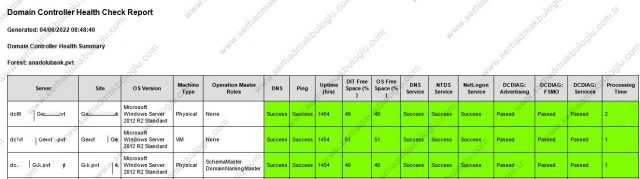
Script’i herhangi bir DC üzerinde Task Schedule’a ekleyerek her gün mail alabilirsiniz. Script işletim sistemi versiyonu, fsmo rolleri, dns, uptime, free disk space, dns-ntds service durumları ve daha fazlası gibi detayları içermektedir.
## Active Directory: PowerShell Script to Perform Health Reports on Domain Controllers in an Active Directory Forest ##

 <#
.SYNOPSIS
Test-DomainControllerHealth - Domain Controller Health Check Script.
.DESCRIPTION
This script performs a list of common health checks to a specific domain, or the entire forest. The results are then compiled into a colour coded HTML report.
.OUTPUTS
The results are currently only output to HTML for email or as an HTML report file, or sent as an SMTP message with an HTML body.
.PARAMETER domainName
Perform a health check on a specific Active Directory domain.
.PARAMETER ReportFile
Output the report details to a file in the current directory.
.PARAMETER SendEmail
Send the report via email. You have to configure the correct SMTP settings.
.EXAMPLE
.\GetADForestHealthStatusReport.ps1
Checks all domains and all domain controllers in your current forest.
.EXAMPLE
.\GetADForestHealthStatusReport.ps1 -domainName acme.com
Checks all the domain controllers in the specified domain "acme.com".
.EXAMPLE
.\GetADForestHealthStatusReport.ps1 -domainName acme.com -SendEmail
Checks all the domain controllers in the specified domain "acme.com", and sends the resulting report as an email message.
.LINK
https://github.com/technologicza/Test-DomainControllerHealth.ps1
http://www.powershellneedfulthings.com/?p=533
.NOTES
Written by: Jean Louw
Find me on:
* Blog:	https://powershellneedfulthings.com
* Twitter:	https://twitter.com/jeanlouw
* Github:	https://github.com/technologicza
Additional Credits (code contributions and testing):
- Paul Cunningham (All of the HTML generating code was adopted from: https://github.com/cunninghamp/Test-ExchangeServerHealth.ps1)
- Anil Erduran (Code to parse DCDiag output with Powershell adtopted from: https://gallery.technet.microsoft.com/scriptcenter/Parse-DCDIAG-with-ce430b71)
- Testing credits to Gabriel Gumbs. You can find him at https://twitter.com/GabrielGumbs
- Testing credits to Dhillan Kalyan. You can find him at https://twitter.com/DjGuji
License:
The MIT License (MIT)
Copyright (c) 2017 Jean Louw (powershellneedfulthings.com)
Permission is hereby granted, free of charge, to any person obtaining a copy
of this software and associated documentation files (the "Software"), to deal
in the Software without restriction, including without limitation the rights
to use, copy, modify, merge, publish, distribute, sublicense, and/or sell
copies of the Software, and to permit persons to whom the Software is
furnished to do so, subject to the following conditions:
The above copyright notice and this permission notice shall be included in all
copies or substantial portions of the Software.
THE SOFTWARE IS PROVIDED "AS IS", WITHOUT WARRANTY OF ANY KIND, EXPRESS OR
IMPLIED, INCLUDING BUT NOT LIMITED TO THE WARRANTIES OF MERCHANTABILITY,
FITNESS FOR A PARTICULAR PURPOSE AND NONINFRINGEMENT. IN NO EVENT SHALL THE
AUTHORS OR COPYRIGHT HOLDERS BE LIABLE FOR ANY CLAIM, DAMAGES OR OTHER
LIABILITY, WHETHER IN AN ACTION OF CONTRACT, TORT OR OTHERWISE, ARISING FROM,
OUT OF OR IN CONNECTION WITH THE SOFTWARE OR THE USE OR OTHER DEALINGS IN THE
SOFTWARE.
Change Log
V1.00, 06/09/2017 - Initial version
V1.01, 05/10/2017 - First
#>

[CmdletBinding()]
Param(
  [Parameter( Mandatory=$false)]
  [string]$domainName,

  [Parameter( Mandatory=$false)]
  [switch]$ReportFile,

  [Parameter( Mandatory=$false)]
  [switch]$SendEmail
)

#...................................
# Global Variables
#...................................

$now = Get-Date
$date = $now.ToShortDateString()
[array]$allDomainControllers = @()
$reportime = Get-Date
$reportemailsubject = "Domain Controller Health Report"

$smtpsettings = @{
    To =  'sistemyonetimi'
    From = 'dchealth'
    Subject = "$reportemailsubject - $now"
    SmtpServer = "smtpsever"
    }

#...................................
# Functions
#...................................

#This fucntion gets all the domains in the forest.
Function Get-AllDomains() {
Write-Verbose "..running function Get-AllDomains"
$allDomains = (Get-ADForest).Domains
return $allDomains
}

#This function gets all the domain controllers in a specified domain.
Function Get-AllDomainControllers ($domainNameInput) {
 Write-Verbose "..running function Get-AllDomainControllers"
[array]$allDomainControllers = Get-ADDomainController -Filter * -Server $domainNameInput
return $allDomainControllers
}

#This function tests the name against DNS.
Function Get-DomainControllerNSLookup($domainNameInput){
Write-Verbose "..running function Get-DomainControllerNSLookup"
try{
$domainControllerNSLookupResult = Resolve-DnsName $domainNameInput -Type A | select -ExpandProperty IPAddress

$domainControllerNSLookupResult = 'Success'
}
catch
{
$domainControllerNSLookupResult = 'Fail'
}
return $domainControllerNSLookupResult

}

#This function tests the connectivity to the domain controller.
Function Get-DomainControllerPingStatus($domainNameInput){
Write-Verbose "..running function Get-DomainControllerPingStatus"
If ((Test-Connection $domainNameInput -Count 1 -quiet) -eq $True)
{
$domainControllerPingStatus = "Success"
}

Else {
$domainControllerPingStatus = 'Fail'
}
return $domainControllerPingStatus
}

#This function tests the domain controller uptime.
Function Get-DomainControllerUpTime($domainNameInput){
Write-Verbose "..running function Get-DomainControllerUpTime"

If ((Test-Connection $domainNameInput -Count 1 -quiet) -eq $True)
{
try {
$W32OS = Get-WmiObject -Class Win32_OperatingSystem -ComputerName $domainNameInput -ErrorAction SilentlyContinue
$timespan = $W32OS.ConvertToDateTime($W32OS.LocalDateTime) – $W32OS.ConvertToDateTime($W32OS.LastBootUpTime)
[int]$uptime = "{0:00}" -f $timespan.TotalHours
}
catch [exception] {
$uptime = 'WMI Failure'
}

}

Else {
$uptime = '0'
}

return $uptime
}

#This function checks the DIT file drive space.
Function Get-DITFileDriveSpace($domainNameInput){
Write-Verbose "..running function Get-DITFileDriveSpace"


If ((Test-Connection $domainNameInput -Count 1 -quiet) -eq $True)
{
try{
$key = “SYSTEM\CurrentControlSet\Services\NTDS\Parameters”
$valuename = “DSA Database file”
$reg = [Microsoft.Win32.RegistryKey]::OpenRemoteBaseKey(‘LocalMachine’, $domainNameInput)
$regkey = $reg.opensubkey($key)
$NTDSPath = $regkey.getvalue($valuename)
$NTDSPathDrive = $NTDSPath.ToString().Substring(0,2)
$NTDSPathFilter = '"' + 'DeviceID=' + "'" + $NTDSPathDrive + "'" + '"'
$NTDSDiskDrive = Get-WmiObject -Class Win32_LogicalDisk -ComputerName $domainNameInput -ErrorAction SilentlyContinue | ?{$_.DeviceID -eq $NTDSPathDrive}
$NTDSPercentFree =  [math]::Round($NTDSDiskDrive.FreeSpace/$NTDSDiskDrive.Size*100)

}

catch [exception] {
$NTDSPercentFree = 'WMI Failure'
}
}
Else {
$NTDSPercentFree = '0'
}
return $NTDSPercentFree
}

#This function checks the DNS, NTDS and Netlogon services.
Function Get-DomainControllerServices($domainNameInput){
Write-Verbose "..running function DomainControllerServices"
$thisDomainControllerServicesTestResult = New-Object PSObject
$thisDomainControllerServicesTestResult | Add-Member NoteProperty -name DNSService -Value $null
$thisDomainControllerServicesTestResult | Add-Member NoteProperty -name NTDSService -Value $null
$thisDomainControllerServicesTestResult | Add-Member NoteProperty -name NETLOGONService -Value $null

If ((Test-Connection $domainNameInput -Count 1 -quiet) -eq $True)
{
If ((Get-Service -ComputerName $domainNameInput -Name DNS -ErrorAction SilentlyContinue).Status -eq 'Running'){
    $thisDomainControllerServicesTestResult.DNSService = 'Success'
    }
    Else {
    $thisDomainControllerServicesTestResult.DNSService = 'Fail'
    }
If ((Get-Service -ComputerName $domainNameInput -Name NTDS -ErrorAction SilentlyContinue).Status -eq 'Running'){
    $thisDomainControllerServicesTestResult.NTDSService = 'Success'
    }
    Else {
    $thisDomainControllerServicesTestResult.NTDSService = 'Fail'
    }
If ((Get-Service -ComputerName $domainNameInput -Name netlogon -ErrorAction SilentlyContinue).Status -eq 'Running'){
    $thisDomainControllerServicesTestResult.NETLOGONService = 'Success'
    }
    Else {
    $thisDomainControllerServicesTestResult.NETLOGONService = 'Fail'
    }
}

Else {
    $thisDomainControllerServicesTestResult.DNSService = 'Fail'
    $thisDomainControllerServicesTestResult.NTDSService = 'Fail'
    $thisDomainControllerServicesTestResult.NETLOGONService = 'Fail'
}

return $thisDomainControllerServicesTestResult

}

#This function runs the three DCDiag tests and saves them in a variable for later processing.
Function Get-DomainControllerDCDiagTestResults($domainNameInput){
Write-Verbose "..running function Get-DomainControllerDCDiagTestResults"

$DCDiagTestResults = New-Object Object
If ((Test-Connection $domainNameInput -Count 1 -quiet) -eq $True)
{

$DCDiagTest = (Dcdiag.exe /s:$domainNameInput /test:services /test:KnowsOfRoleHolders /test:Advertising) -split ('[\r\n]')

    $DCDiagTestResults | Add-Member -Type NoteProperty -Name "ServerName" -Value $domainNameInput
        $DCDiagTest | %{
        Switch -RegEx ($_)
        {
         "Starting"      { $TestName   = ($_ -Replace ".*Starting test: ").Trim() }
         "passed test|failed test" { If ($_ -Match "passed test") {
         $TestStatus = "Passed"
         # $TestName
         # $_
         }
         Else
         {
         $TestStatus = "Failed"
          # $TestName
         # $_
         } }
        }
        If ($TestName -ne $Null -And $TestStatus -ne $Null)
        {
         $DCDiagTestResults | Add-Member -Name $("$TestName".Trim()) -Value $TestStatus -Type NoteProperty -force
         $TestName = $Null; $TestStatus = $Null
        }
        }
return $DCDiagTestResults
}

Else {
$DCDiagTestResults | Add-Member -Type NoteProperty -Name "ServerName" -Value $domainNameInput
$DCDiagTestResults | Add-Member -Name Advertising -Value 'Failed' -Type NoteProperty -force
$DCDiagTestResults | Add-Member -Name KnowsOfRoleHolders -Value 'Failed' -Type NoteProperty -force
$DCDiagTestResults | Add-Member -Name Services -Value 'Failed' -Type NoteProperty -force
}


return $DCDiagTestResults
}

#This function checks the server OS version.
Function Get-DomainControllerOSVersion ($domainNameInput){
Write-Verbose "..running function Get-DomainControllerOSVersion"
$W32OSVersion = (Get-WmiObject -Class Win32_OperatingSystem -ComputerName $domainNameInput -ErrorAction SilentlyContinue).Caption
return $W32OSVersion
}

#This function determines if the machine type is a physical or virtual machine.
Function Get-DomainControllerMachineType ($domainNameInput){
Write-Verbose "..running function Get-DomainControllerMachineType"
$thisComputerSystemInfo = Get-WmiObject -Class Win32_ComputerSystem -ComputerName $domainNameInput -ErrorAction SilentlyContinue
switch ($thisComputerSystemInfo.Model) {

    "Virtual Machine" {
        $MachineType="VM"
        }
    "VMware Virtual Platform" {
        $MachineType="VM"
        }
    "VirtualBox" {
        $MachineType="VM"
        }
    default {
        $MachineType="Physical"
        }
}

return $MachineType
}

#This function checks the free space on the OS drive
Function Get-DomainControllerOSDriveFreeSpace ($domainNameInput){
Write-Verbose "..running function Get-DomainControllerOSDriveFreeSpace"

If ((Test-Connection $domainNameInput -Count 1 -quiet) -eq $True)
{
try{
$thisOSDriveLetter = (Get-WmiObject Win32_OperatingSystem -ComputerName $domainNameInput -ErrorAction SilentlyContinue).SystemDrive
$thisOSPathFilter = '"' + 'DeviceID=' + "'" + $thisOSDriveLetter + "'" + '"'
$thisOSDiskDrive = Get-WmiObject -Class Win32_LogicalDisk -ComputerName $domainNameInput -ErrorAction SilentlyContinue | ?{$_.DeviceID -eq $thisOSDriveLetter}
$thisOSPercentFree =  [math]::Round($thisOSDiskDrive.FreeSpace/$thisOSDiskDrive.Size*100)
}

catch [exception] {
$thisOSPercentFree = 'WMI Failure'
}
}
return $thisOSPercentFree
}

#This function generates HTML code from the results of the above functions.
Function New-ServerHealthHTMLTableCell(){
    param( $lineitem )
    $htmltablecell = $null

    switch ($($reportline."$lineitem"))
    {
        $success {$htmltablecell = "<td class=""pass"">$($reportline."$lineitem")</td>"}
        "Success" {$htmltablecell = "<td class=""pass"">$($reportline."$lineitem")</td>"}
        "Passed" {$htmltablecell = "<td class=""pass"">$($reportline."$lineitem")</td>"}
        "Pass" {$htmltablecell = "<td class=""pass"">$($reportline."$lineitem")</td>"}
        "Warn" {$htmltablecell = "<td class=""warn"">$($reportline."$lineitem")</td>"}
        "Access Denied" {$htmltablecell = "<td class=""warn"">$($reportline."$lineitem")</td>"}
        "Fail" {$htmltablecell = "<td class=""fail"">$($reportline."$lineitem")</td>"}
        "Failed" {$htmltablecell = "<td class=""fail"">$($reportline."$lineitem")</td>"}
        "Could not test server uptime." {$htmltablecell = "<td class=""fail"">$($reportline."$lineitem")</td>"}
        "Could not test service health. " {$htmltablecell = "<td class=""warn"">$($reportline."$lineitem")</td>"}
        "Unknown" {$htmltablecell = "<td class=""warn"">$($reportline."$lineitem")</td>"}
        default {$htmltablecell = "<td>$($reportline."$lineitem")</td>"}
    }

    return $htmltablecell
}

if (!($domainName)){
Write-Host "..no domain specified, using all domains in forest" -ForegroundColor Yellow
$allDomains = Get-AllDomains
$reportFileName = 'forest_health_report_' + (Get-ADForest).name + '.html'
}

Else{
Write-Host "..domain name specified on cmdline"
$allDomains = $domainName
$reportFileName = 'dc_health_report_' + $domainName + '.html'
}

foreach ($domain in $allDomains){
Write-Host "..testing domain" $domain -ForegroundColor Green
[array]$allDomainControllers = Get-AllDomainControllers $domain
$totalDCtoProcessCounter = $allDomainControllers.Count
$totalDCProcessCount = $allDomainControllers.Count

foreach ($domainController in $allDomainControllers){
    $stopWatch = [system.diagnostics.stopwatch]::StartNew()
    Write-Host "..testing domain controller" "(${totalDCtoProcessCounter} of ${totalDCProcessCount})" $domainController.HostName -ForegroundColor Cyan
    $DCDiagTestResults = Get-DomainControllerDCDiagTestResults $domainController.HostName
    $thisDomainController = New-Object PSObject
    $thisDomainController | Add-Member NoteProperty -name Server -Value $null
    $thisDomainController | Add-Member NoteProperty -name Site -Value $null
    $thisDomainController | Add-Member NoteProperty -name "OS Version" -Value $null
    $thisDomainController | Add-Member NoteProperty -name "Machine Type" -Value $null
    $thisDomainController | Add-Member NoteProperty -name "Operation Master Roles" -Value $null
    $thisDomainController | Add-Member NoteProperty -name "DNS" -Value $null
    $thisDomainController | Add-Member NoteProperty -name "Ping" -Value $null
    $thisDomainController | Add-Member NoteProperty -name "Uptime (hrs)" -Value $null
    $thisDomainController | Add-Member NoteProperty -name "DIT Free Space (%)" -Value $null
    $thisDomainController | Add-Member NoteProperty -name "OS Free Space (%)" -Value $null
    $thisDomainController | Add-Member NoteProperty -name "DNS Service" -Value $null
    $thisDomainController | Add-Member NoteProperty -name "NTDS Service" -Value $null
    $thisDomainController | Add-Member NoteProperty -name "NetLogon Service" -Value $null
    $thisDomainController | Add-Member NoteProperty -name "DCDIAG: Advertising" -Value $null
    $thisDomainController | Add-Member NoteProperty -name "DCDIAG: FSMO" -Value $null
    $thisDomainController | Add-Member NoteProperty -name "DCDIAG: Services" -Value $null
    $thisDomainController | Add-Member NoteProperty -name "Processing Time" -Value $null
    $OFS = "rn"
    $thisDomainController.Server = ($domainController.HostName).ToLower()
    $thisDomainController.Site = $domainController.Site
    $thisDomainController."OS Version" = (Get-DomainControllerOSVersion $domainController.hostname)
    $thisDomainController."Machine Type" = (Get-DomainControllerMachineType $domainController.hostname)
    $thisDomainController."Operation Master Roles" = $domainController.OperationMasterRoles
    $thisDomainController.DNS = Get-DomainControllerNSLookup $domainController.HostName
    $thisDomainController.Ping = Get-DomainControllerPingStatus $domainController.HostName
    $thisDomainController."Uptime (hrs)" = Get-DomainControllerUpTime $domainController.HostName
    $thisDomainController."DIT Free Space (%)" = Get-DITFileDriveSpace $domainController.HostName
    $thisDomainController."OS Free Space (%)" = Get-DomainControllerOSDriveFreeSpace $domainController.HostName
    $thisDomainController."DNS Service" = (Get-DomainControllerServices $domainController.HostName).DNSService
    $thisDomainController."NTDS Service" = (Get-DomainControllerServices $domainController.HostName).NTDSService
    $thisDomainController."NetLogon Service" = (Get-DomainControllerServices $domainController.HostName).NETLOGONService
    $thisDomainController."DCDIAG: Advertising" = $DCDiagTestResults.Advertising
    $thisDomainController."DCDIAG: FSMO" = $DCDiagTestResults.KnowsOfRoleHolders
    $thisDomainController."DCDIAG: Services" = $DCDiagTestResults.Services
    $thisDomainController."Processing Time" = $stopWatch.Elapsed.Seconds
    [array]$allTestedDomainControllers += $thisDomainController
    $totalDCtoProcessCounter --
    }

}

    #Common HTML head and styles
    $htmlhead="<html>
                <style>
                BODY{font-family: Arial; font-size: 8pt;}
                H1{font-size: 16px;}
                H2{font-size: 14px;}
                H3{font-size: 12px;}
                TABLE{border: 1px solid black; border-collapse: collapse; font-size: 8pt;}
                TH{border: 1px solid black; background: #dddddd; padding: 5px; color: #000000;}
                TD{border: 1px solid black; padding: 5px; }
                td.pass{background: #7FFF00;}
                td.warn{background: #FFE600;}
                td.fail{background: #FF0000; color: #ffffff;}
                td.info{background: #85D4FF;}
                </style>
                <body>
                <h1 align=""left"">Domain Controller Health Check Report</h1>
                <h3 align=""left"">Generated: $reportime</h3>"

    #Domain Controller Health Report Table Header
    $htmltableheader = "<h3>Domain Controller Health Summary</h3>
                        <h3>Forest: $((Get-ADForest).Name)</h3>
                        <p>
                        <table>
                        <tr>
                        <th>Server</th>
                        <th>Site</th>
                        <th>OS Version</th>
                        <th>Machine Type</th>
                        <th>Operation Master Roles</th>
                        <th>DNS</th>
                        <th>Ping</th>
                        <th>Uptime (hrs)</th>
                        <th>DIT Free Space (%)</th>
                        <th>OS Free Space (%)</th>
                        <th>DNS Service</th>
                        <th>NTDS Service</th>
                        <th>NetLogon Service</th>
                        <th>DCDIAG: Advertising</th>
                        <th>DCDIAG: FSMO</th>
                        <th>DCDIAG: Services</th>
                        <th>Processing Time</th>
                        </tr>"

    #Domain Controller Health Report Table
    $serverhealthhtmltable = $serverhealthhtmltable + $htmltableheader

    #This section will process through the $allTestedDomainControllers array object and create and colour the HTML table based on certain conditions.
    foreach ($reportline in $allTestedDomainControllers)
    {

      if (Test-Path variable:fsmoRoleHTML)

        {
            Remove-Variable fsmoRoleHTML
        }

        if (($reportline."Operation Master Roles") -gt 0)
        {
            foreach ($line in $reportline."Operation Master Roles")
            {
                if ($line.count -gt 0)

                {
                [array]$fsmoRoleHTML += $line.ToString() + '<br>'
                }
            }
        }

                else
                    {
                        $fsmoRoleHTML += 'None<br>'
                    }

        $htmltablerow = "<tr>"
        $htmltablerow += "<td>$($reportline.server)</td>"
        $htmltablerow += "<td>$($reportline.site)</td>"
        $htmltablerow += "<td>$($reportline."OS Version")</td>"
        $htmltablerow += "<td>$($reportline."Machine Type")</td>"
        $htmltablerow += "<td>$($fsmoRoleHTML)</td>"
        $htmltablerow += (New-ServerHealthHTMLTableCell "DNS" )
        $htmltablerow += (New-ServerHealthHTMLTableCell "Ping")

        if ($($reportline."uptime (hrs)") -eq "WMI Failure")
        {
            $htmltablerow += "<td class=""warn"">Could not test server uptime.</td>"
        }
        elseif ($($reportline."Uptime (hrs)") -eq $string17)
        {
            $htmltablerow += "<td class=""warn"">$string17</td>"
        }
        else
        {
            $hours = [int]$($reportline."Uptime (hrs)")
            if ($hours -le 24)
            {
                $htmltablerow += "<td class=""warn"">$hours</td>"
            }
            else
            {
                $htmltablerow += "<td class=""pass"">$hours</td>"
            }
        }

        $space = $reportline."DIT Free Space (%)"

            if ($space -eq "WMI Failure")
            {
            $htmltablerow += "<td class=""warn"">Could not test server free space.</td>"
            }
            elseif ($space -le 10)
            {
                $htmltablerow += "<td class=""warn"">$space</td>"
            }
            else
            {
                $htmltablerow += "<td class=""pass"">$space</td>"
            }

        $osSpace = $reportline."OS Free Space (%)"

            if ($osSpace -eq "WMI Failure")
            {
            $htmltablerow += "<td class=""warn"">Could not test server free space.</td>"
            }
            elseif ($osSpace -le 10)
            {
                $htmltablerow += "<td class=""warn"">$osSpace</td>"
            }
            else
            {
                $htmltablerow += "<td class=""pass"">$osSpace</td>"
            }

          $htmltablerow += (New-ServerHealthHTMLTableCell "DNS Service")
          $htmltablerow += (New-ServerHealthHTMLTableCell "NTDS Service")
          $htmltablerow += (New-ServerHealthHTMLTableCell "NetLogon Service")
          $htmltablerow += (New-ServerHealthHTMLTableCell "DCDIAG: Advertising")
          $htmltablerow += (New-ServerHealthHTMLTableCell "DCDIAG: FSMO")
          $htmltablerow += (New-ServerHealthHTMLTableCell "DCDIAG: Services")

          $averageProcessingTime = ($allTestedDomainControllers | measure -Property "Processing Time" -Average).Average
          if ($($reportline."Processing Time") -gt $averageProcessingTime)
            {
                $htmltablerow += "<td class=""warn"">$($reportline."Processing Time")</td>"
            }
        elseif ($($reportline."Processing Time") -le $averageProcessingTime)
        {
            $htmltablerow += "<td class=""pass"">$($reportline."Processing Time")</td>"
        }

          [array]$serverhealthhtmltable = $serverhealthhtmltable + $htmltablerow
        }

    $serverhealthhtmltable = $serverhealthhtmltable + "</table></p>"

    $htmltail = "* Windows 2003 Domain Controllers do not have the NTDS Service running. Failing this test is normal for that version of Windows.<br>
    * DNS test is performed using Resolve-DnsName. This cmdlet is only available from Windows 2012 onwards.
                </body>
                </html>"

    $htmlreport = $htmlhead + $serversummaryhtml + $dagsummaryhtml + $serverhealthhtmltable + $dagreportbody + $htmltail

     if ($ReportFile)
    {
        $htmlreport | Out-File $reportFileName -Encoding UTF8
    }

    if ($SendEmail)
    {
      #Send email message
      Send-MailMessage @smtpsettings -Body $htmlreport -BodyAsHtml -Encoding ([System.Text.Encoding]::UTF8)

    }